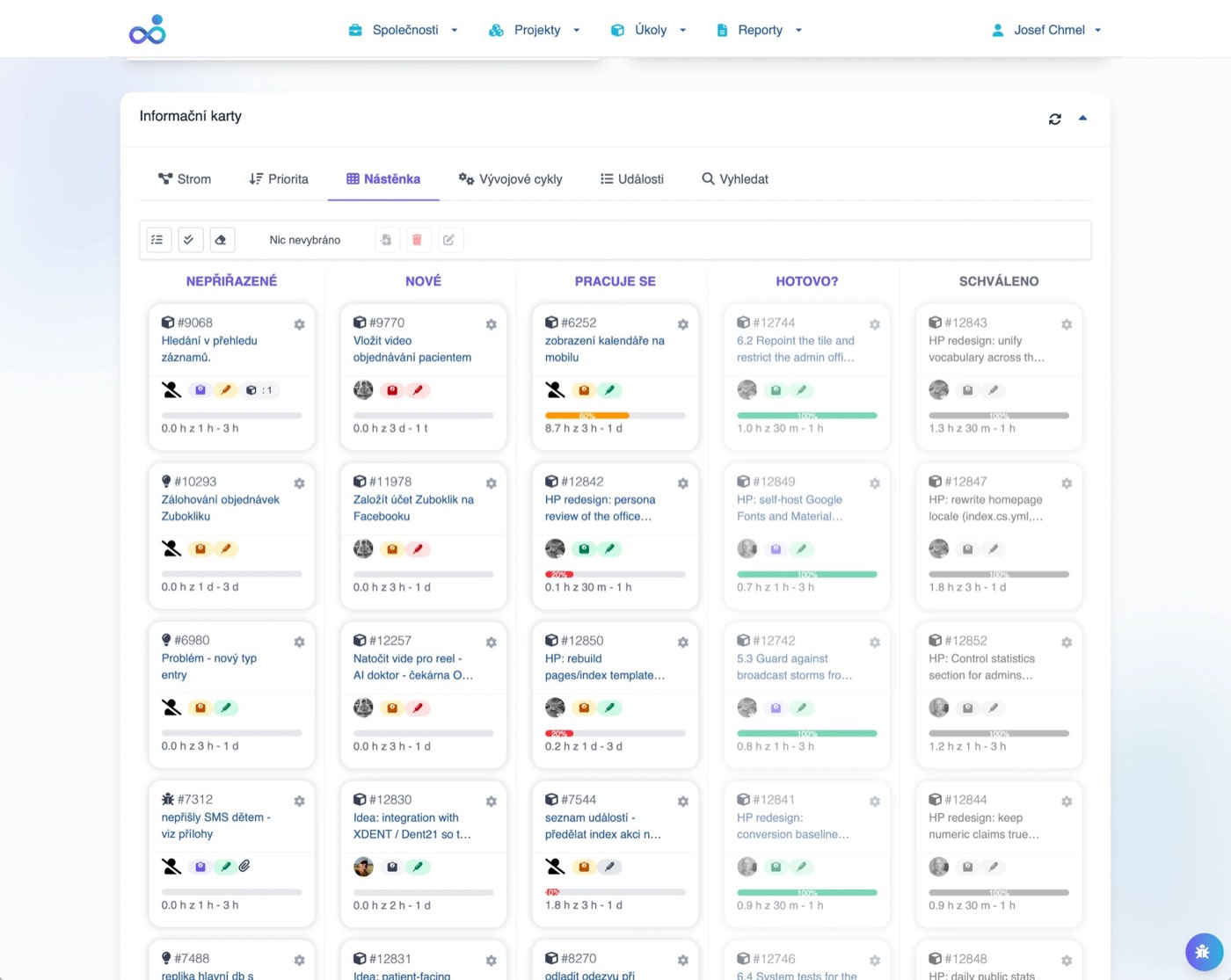
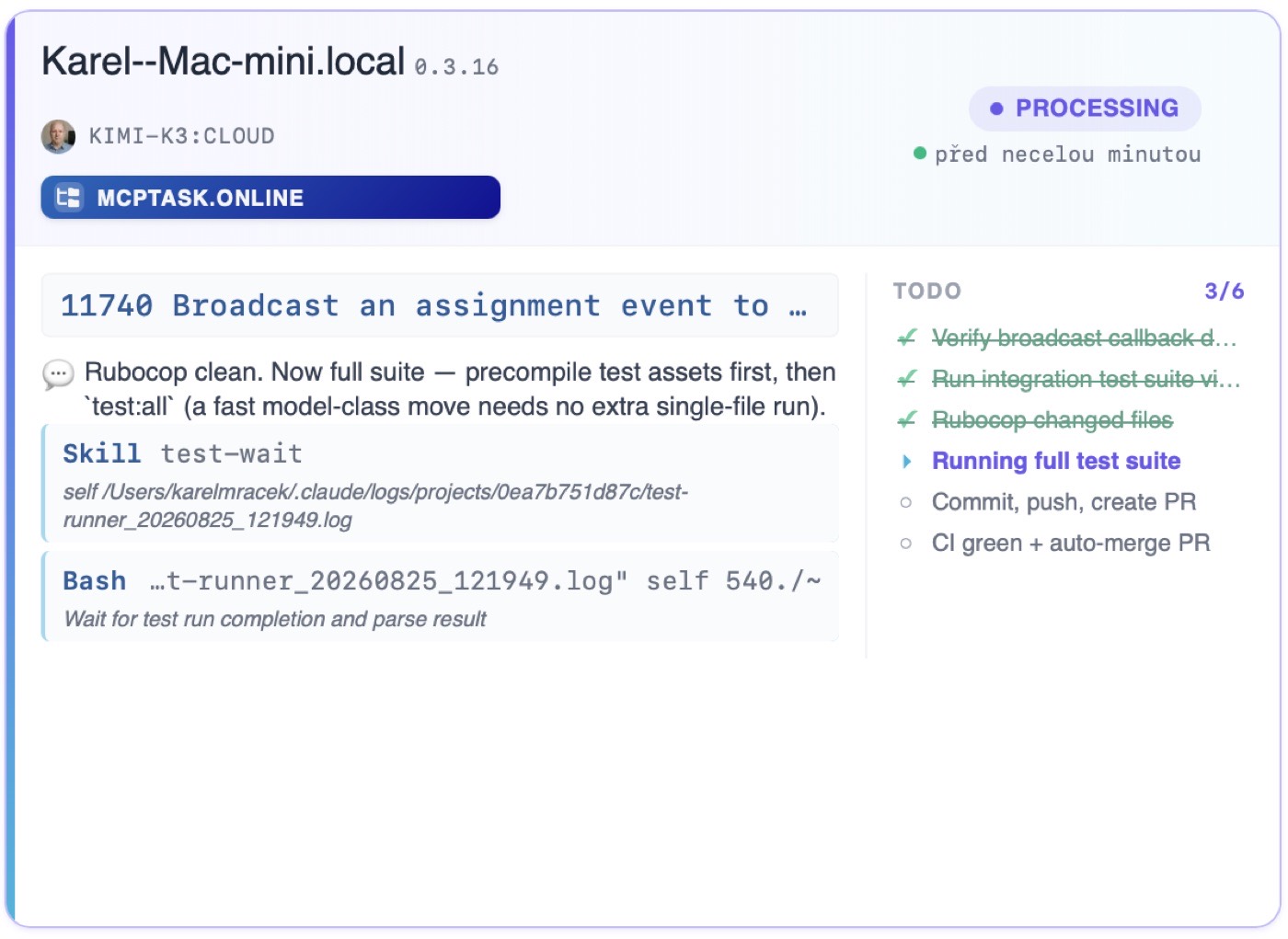
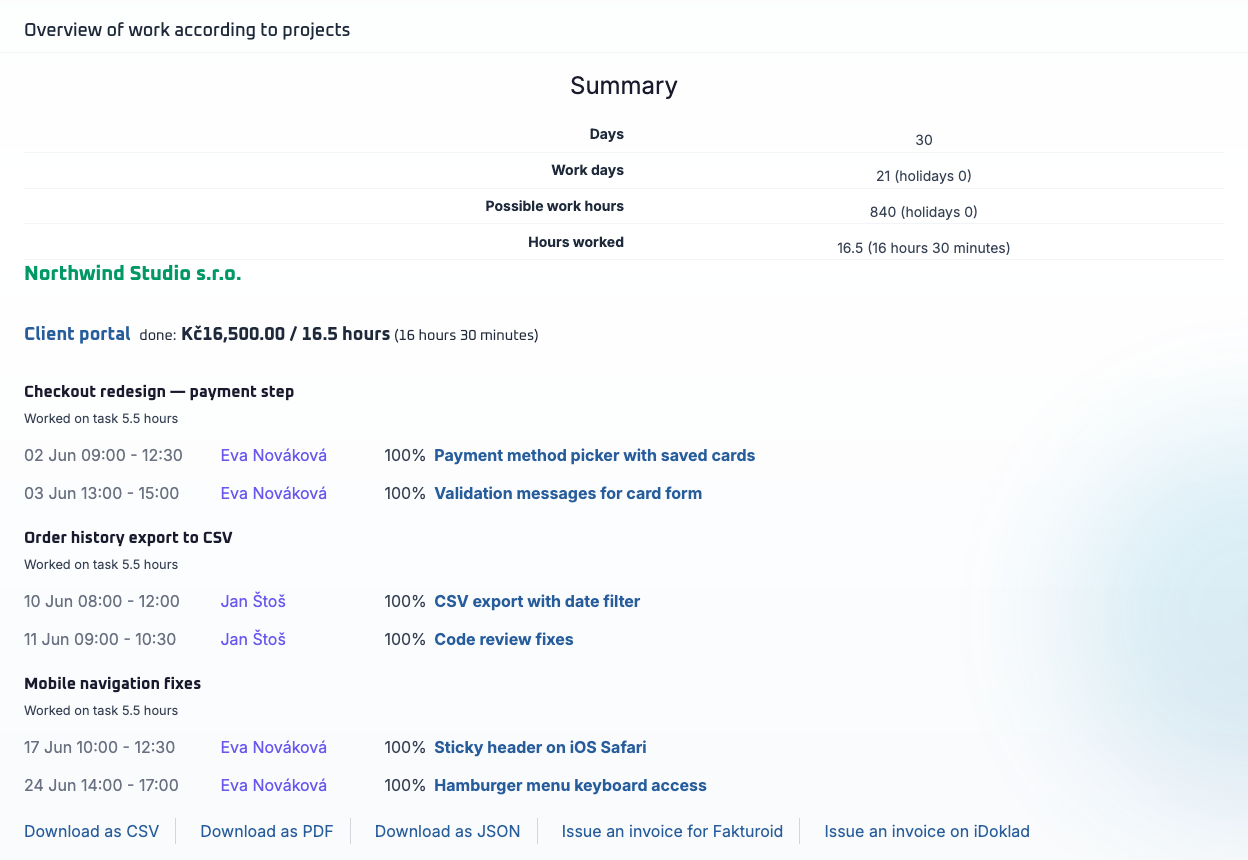
Features that get an AI task all the way to a merged PR and a paid invoice.
mcptask.online is the only platform where an AI agent's work flows through time tracking, approval, and invoicing — not just a ticket. Model-agnostic, runs on your own infrastructure, recovers from interruptions.
8 Feature Categories
Jira and Linear end at the ticket. Agentic tools end at the PR. mcptask.online takes AI work all the way to a paid invoice.
Jira / Linear
Ticket
Agentic tools
PR
mcptask.online
Paid invoice
Use cases
Real scenarios where mcptask.online saves time and takes work all the way to done.
Merged PR overnight
For well-scoped tasks, the runner can deliver a merged PR overnight — no handoff, no lost context. The work shows up in time tracking the same way human effort does.
- AI work lands in the time sheet, not in a separate log
- No billing — billable effort is logged on top of the runner's output
- One PR per task, ready for review or auto-merged after CI
- Run while you sleep: finish the task, hit CI, merge it
Manager status from chat
Ask for a project status report or assign a task through any MCP client — Claude Desktop, Claude Cowork, Cursor — without opening the app.
- Assign tasks via chat
- Get status reports instantly
- File notes that land on the right task
- No new UI to learn
Invoice AI and human work together
Approved effort from both AI agents and human teammates exports directly to Fakturoid or iDoklad. One audit trail, one invoice.
- AI effort in the same time sheet
- Manager approval before billing
- One-click export to invoicing tools
- Clear attribution for every entry
No free developer? The runner works overnight
A well-scoped task sits in the queue because the team is busy. The runner picks it up overnight and the next morning there is a PR ready for review.
- No need to pull a human off another task
- PR is ready for review the next morning
- Works for clearly described, bounded tasks
- Human review still happens before merge
Low running costs, model choice is yours
Model-agnostic means you are not locked into a premium model from a single vendor. Use cheap or local models and control what you spend on inference.
- Choose the model that fits the task
- Run local or low-cost models for routine work
- No per-seat markup from the platform
- Costs scale with your own infrastructure choices
mcptask_runner: the autonomous developer that takes a task to a merged PR
mcptask_runner is a Ruby gem that wraps Claude Code with a real autonomous loop. It picks the next task, judges complexity, picks the right model, writes code and tests, opens a PR, watches CI, and merges when green. Runs on YOUR infrastructure against the real environment (real DB, system tests). Model-agnostic — including cheap or local models.
Hits a foreign bug? Files it, pins it, returns to your task
If the runner hits an urgent bug unrelated to the current task, it commits and pushes the in-progress work, switches to main, files a new urgent bug task, and pins it to disk. Even after a restart it fixes the bug first and only then returns to the original task. Chaos becomes a tracked, owned item.
Model-agnostic, on your own infrastructure
The runner picks the right model for each task — including cheap or local ones. It runs against your real environment (real DB, real system tests), not a sandbox. No lock-in to a premium model; you control the cost and the data.
From task to merged PR, end to end
The runner doesn't just 'open Claude Code on a task'. It runs the full workflow: branch → code → unit tests → screenshots → system tests → push → PR → CI. A task isn't done until CI is green and the PR is merged.
Survives context overflow and interruption
If a run ends because of context overflow, a quota hit, or an urgent bug, the task stays in_progress and the unfinished work stays on the branch. The next run picks it up: reads git log + branch state, merges origin/main, skips already-done steps, and escalates the model to a stronger one.
Watchdogs, stall detection, daily quota
Heartbeat monitoring kills idle runs at 20 minutes, soft-warns on frozen at 3, caps stuck tools, and refreshes the daily quota every tick. Stall detection recognizes 'spinning in place' and kills it — the task resumes on a stronger model next time. Quota is fail-closed.
Triage and model selection (three levels)
Before any work, triage rates the task's complexity and recommends a model: genius (heavy code), smart (triage/review), or primitive (read-only). Model ids are versioned so retry strings survive context overflow.
Your code stays on your infrastructure. Your account data stays in the EU.
Two separate layers, both under your control. The runner executes on your own machines, so your source code never leaves your environment. The mcptask.online platform stores data in EU data centers (Frankfurt) with GDPR-compliant controls and a full audit trail.
AI Sees Only What You Allow
Scoped permissions for AI agents. Restrict by project, task type, or action. Full control over what AI can read, write, and modify.
- Project-level access
- Task type restrictions
- Read-only vs. write
- Action limits (no delete, etc.)
Every AI Action Tracked
Complete audit trail of all AI activity. What task was accessed, what changes were made, when, and by which agent. Exportable for compliance.
- Task accessed
- Status changed
- Effort logged
- Comment added
- File uploaded
Bank-Level Security
Data encrypted in transit (TLS). Passwords bcrypt-hashed. Servers access-restricted (SSH-key only) and kept up to date. Regular security reviews.
EU Data Protection
Full GDPR compliance. Data stored in EU (Frankfurt). Data export anytime. Right to erasure. Data processing agreements available.
Data Stays in Europe
All servers in EU data centers (Frankfurt, Germany). No data transfer outside EU. Compliant with EU data sovereignty requirements.
AI Access Control
Scoped permissions for every AI agent with project-level restrictions
Data Protection
TLS 1.3 in transit, bcrypt-hashed passwords, SSH-key-only server access
EU Compliance
GDPR compliant with data stored in EU data centers (Frankfurt)
Data Protection Standards
Enterprise security for your AI workflows
SSH Key
TLS 1.3
GDPR
EU Data
The only platform where an AI agent's work flows all the way to a paid invoice
Jira and Linear end at the ticket. Agentic tools end at the PR. mcptask.online closes the loop: time tracking captures AI work, managers approve it, and the result exports to Fakturoid or iDoklad for invoicing. One audit trail from chat to cash.
AI work lands in the time sheet automatically
When the runner works a task, every action logs effort: duration, description, progress, blockers. Human work and AI work live in the same time sheet, the same approval flow, the same export.
Approval flow: Logged → Approved → Billed
Managers review AI-logged effort alongside human effort. Pending → Approved → Billed. Adjust if needed. The audit trail is the same for both — clients see one stream of work, not two.
Export to Fakturoid and iDoklad
Approved effort exports directly to Fakturoid or iDoklad. No double entry, no spreadsheet glue. The runner's work is billable, the audit trail is intact, and the invoice shows up like any other.
Logged
AI and human work in the same time sheet
Approved
Manager reviews, adjusts, signs off
Billed
Export to Fakturoid or iDoklad in one click
One MCP server, two kinds of users
mcptask.online runs a standard Model Context Protocol server. AI coding agents use it to read tasks, log work, open PRs. Managers use it through any MCP client (Claude Desktop, Claude Cowork, Cursor) to assign tasks, ask for a project status, or file a note through chat. No new UI to learn.
For managers: run the project from chat
The same MCP server is a standard interface. Plug it into Claude Desktop, Claude Cowork, Cursor, or any MCP client — assign tasks, ask for a status report, or file a note without learning a new UI.
Assign a task through chat
Ask for a project status report
File a note that lands on the right task
Native MCP Protocol Support
The Model Context Protocol is how modern AI assistants communicate with external tools. mcptask.online provides a full MCP server implementation, allowing AI agents to read tasks, update status, log work, and more - using their native language.
- Read task details, descriptions, and context
- List available tasks (filtered by project, status, priority)
- Update task status (in progress, completed, blocked)
- Log work efforts with descriptions
AI Sees Full Task Context
When AI requests a task, it receives complete context: description, acceptance criteria, related tasks, comments, attached files, and history. No manual copy-paste required.
- Task name and full description (Markdown supported)
- Parent epic/story context
- Related tasks and dependencies
- Previous comments and discussions
- Zero context setup time
- AI understands full requirements
- Consistent information every time
AI Fetches Next Task Automatically
Configure your AI agent to operate autonomously: fetch highest-priority available task, complete it, log work, mark done, move to next. Set boundaries (project scope, task types), then let AI work.
- AI calls get_next_task() via MCP
- mcptask.online returns highest-priority available task
- AI works on task
- AI calls log_effort() with work description
- Limit to specific projects
- Limit to specific task types
- Priority thresholds
Automatic Effort Tracking
Every action AI takes is logged: tasks viewed, work performed, status changes. AI can also explicitly log effort with descriptions, duration, and progress percentage.
- Task opened/viewed
- Status changes
- Comments added
- Files attached
- Work description
- Duration in minutes
- Progress percentage
Run Multiple AI Agents
Connect unlimited AI agents to your mcptask.online workspace. Each agent identified separately. Work distributed automatically. No conflicts, clear attribution.
- Each agent has unique API key
- Clear identification in logs
- Work distribution by project/task type
- No duplicate work (task locking)
- Different agents for different projects
- Specialized agents (frontend, backend, docs)
- 24/7 coverage with multiple agents
{
"mcpServers": {
"mcptask-online": {
"type": "sse",
"name": "McpTask.online",
"url": "https://mcptask.online/mcp/sse",
"headers": {
"Authorization": "Bearer ${MCPTASK_ONLINE_TOKEN}"
}
}
}
}For developers: why it actually reaches the finish
Reliability that stays invisible during normal operation
MCP protocol over SSE (Server-Sent Events)
JWT authentication for secure access
Pub/Sub messaging for real-time communication
Scoped permissions per agent
Connect Your Development Workflow
GitHub, GitLab, and more. Your commits become time entries. Your PRs link to tasks. AI or human - it's all tracked.
Commits Auto-Log Time
Connect GitHub repositories via webhooks. Commits with task references automatically log time. Pull requests link to tasks. Merges can complete tasks.
- Push (commits) - logs time
- Pull Request opened - links to task
- Pull Request merged - can complete task
Self-Hosted and Cloud Support
Full GitLab integration with same features as GitHub. Works with GitLab.com and self-hosted GitLab instances.
- GitLab.com (SaaS)
- GitLab Self-Managed (12.0+)
- GitLab Enterprise
- Integration same as GitHub
Bidirectional Sync with Jira
Import existing Jira projects and sync completed work back. Bidirectional communication keeps both systems synchronized.
- Issue hierarchy (Epic > Story > Task)
- Descriptions and comments
- Attachments
- Sprint assignments
Bidirectional Sync with Trello
Import Trello boards and sync completed work back. Bidirectional communication keeps both systems synchronized.
- Boards -> Projects
- Lists -> Epics/States
- Cards -> Tasks
- Checklists -> Subtasks
- Lists -> Epics (hierarchical)
- Lists -> States (flat)
- Custom mapping
Bidirectional Sync with Redmine
Import existing Redmine projects and sync completed work back. Bidirectional communication keeps both systems synchronized.
- Projects and subprojects
- Issues (all types)
- Descriptions and comments
- Attachments
Build Custom Integrations
Full REST API for custom integrations. JWT authentication. Comprehensive documentation. Use alongside or instead of MCP for specific needs.
- Projects — list
- Tasks — read & create
- Efforts — full CRUD (log time)
- Users — read
Developer Commits
git commit -m "Fix bug #Task-47 2h"
Webhook Fires
GitHub/GitLab notifies mcptask
Time Logged
2h automatically logged to task
Task Updated
PR merge can complete task
Commit Message Parsing
Reference tasks and log time directly from your commits
Track Every Hour (Automatically)
Multiple ways to log time: AI automatic, webhook automatic, timer, manual. All flows to the same place.
AI Logs Its Own Work
When AI agents work through MCP, they log effort automatically. Duration, description, progress - all captured without human intervention.
- Task worked on
- Duration (estimated or actual)
- Work description
- Progress percentage
- Any blockers
- View all AI-logged efforts
- Approve for billing if needed
- Adjust if necessary
- Full audit trail
Commits = Time Entries
GitHub/GitLab webhooks parse commit messages for time data. Include #Task-47 2h in commit and time is logged automatically.
Fix login bug https://mcptask.online/your_company/tasks/47 80%Implement feature URL/47 50%URL/47 Refactored auth 100%- Human developers
- AI agents (Claude Code)
- CI/CD pipelines
Traditional Time Tracking
For work outside code: meetings, design, planning. Enter completion time, start is determined automatically. All work tracked alongside AI work.
- Completion time
- Work description
- Completion percentage
- Automatic start determination
- Quick duration entry
- Bulk entry for past work
- Date picker for backdating
Review Before Billing
Managers can review and approve work before invoicing. See AI-logged vs. human-logged work. Export to PDF, CSV, or invoicing programs.
- Export to PDF
- Export to CSV
- Export to .Doklad
- Export to Fakturoid
- By person (human/AI)
- By project
- By date range
- By approval status
AI Automatic
MCP agents log work automatically as they complete tasks
Webhook Automatic
Commits with task references auto-log time entries
Timer & Manual
Start/stop timers or add entries manually for any work
Effort Approval Flow
Review and approve efforts before invoicing
Logged
Pending
Approved
Billed
Insights on Human and AI Work
Understand where time goes, track AI productivity, and generate client-ready reports.
Tracking Human and AI Productivity
Dedicated reports on all team member activity: completed tasks, logged hours, completion rate. Compare efficiency across projects.
- Completed tasks
- Logged hours
- Average task completion time
- Work efficiency
Where Did Time Go?
Detailed time reports by project, person (human/AI), task type. Export for invoicing or analysis.
- By project
- By person/agent
- By date range
- By task type
Reports
Comprehensive reports for work tracking and attendance. Export for invoicing and internal purposes.
- Work Report - also used for invoicing, various filters
- Work Attendance - overview of who worked how much during which time period
AI Work Reports
Track AI productivity, tasks completed, and contribution ratios
Time Reports
Detailed breakdowns by project, person, and task type
Sprint Tracking
Burndown charts, velocity metrics, and AI contribution breakdown
Basics you expect from a serious tool
Task hierarchy, real-time collaboration, role-based access, and AI context — the fundamentals are covered, so the differentiators above stand on solid ground.
Hierarchical tasks
Epic > Story > Task > Subtask structure
Recurring tasks
Automated maintenance, reports, and regular work
Project templates
Replicate successful project structures
Flexible states
New, In Progress, Blocked, Review, Done
Role-based access
Humans and AI with the right permissions
Real-time updates
See changes instantly without refreshing
In-context discussion
Comments, notes, and file attachments
Activity feed
Track everything in one place
Full task context
AI sees description, history, and attachments
Autonomous next task
AI fetches and works on the next item
Automatic logging
AI logs effort as it works
Multiple agents
Connect unlimited AI agents
Ready to Connect Your AI?
All features included. No credit card required.
See how mcptask.online works in practice
Install mcptask_runner and let it pick a real task from your project.
30-day free trial - Unlimited AI agents - No credit card - GDPR compliant
Frequently Asked Questions
Q1Is the MCP server included on all plans?
Yes! MCP server access is included on all plans, including the free trial. Connect unlimited AI agents.
Q2How is mcptask.online different from Jira or Linear?
Jira and Linear end at the ticket. Agentic tools (Copilot Workspace, Codex, Claude Code by itself) end at the PR. mcptask.online is the only platform that takes AI work all the way to a billable invoice: time tracking, approval, Fakturoid / iDoklad export, real audit trail. No lock-in to a premium model — the runner is model-agnostic and works with cheap or local models too.
Q3Can I use mcptask.online without AI?
Absolutely! It's a full-featured task manager for humans. The MCP server is there when you're ready for AI. Many teams start human-only and add AI later.
Q4Does AI work count toward billing?
For work you invoice to your clients, Yes. For invoices we send to you, NO.
Q5Can a manager work with mcptask through chat, not just AI coding agents?
Yes. The same MCP server is a standard interface that works in any MCP client — Claude Desktop, Claude Cowork, Cursor, and others. A manager can assign a task, ask for a project status report, or file a note through chat, without learning a new UI. The runner is one of two users of the server; chat-based managers and team leads are the other.
Q6How much does running an agent cost, and can I use a cheap or local model?
Yes. The runner is model-agnostic, so you can use cheap or local models and control your own inference spending. You are not locked into a premium model from a single vendor. The platform fee is separate from your inference costs.