"Should we do Scrum or Kanban?" Sooner or later every head of a software company asks this. Usually it happens when urgent customer requests keep breaking the sprints, or the other way round, when the team "does kanban" but nobody can tell when anything will be done. The answer is not "whatever is fashionable". Both approaches solve the same problem, getting work smoothly from request to production, just with different tools. Let's compare them using their official guides and look at when each one fits.
Scrum in a nutshell
Scrum is defined by the Scrum Guide (the current version is from November 2020). Work runs in Sprints of one month or less, and a new Sprint starts right after the previous one ends. Scrum has fixed, timeboxed events. For a one-month Sprint that means Sprint Planning of at most 8 hours, a 15-minute Daily Scrum, a Sprint Review of at most 4 hours and a Retrospective of at most 3 hours. Shorter Sprints get proportionally shorter events.
Scrum also defines accountabilities: the Product Owner is accountable for product value and backlog ordering, the Scrum Master for the team using Scrum effectively, and the Developers for the Sprint plan and quality. A team typically has 10 or fewer people.
One detail companies often forget: according to the Scrum Guide, Sprint scope may be clarified and renegotiated with the Product Owner, but no change may endanger the Sprint Goal and quality must not decrease. So Scrum does not forbid change. It protects the goal.
Kanban in a nutshell
The Kanban Guide (current version from May 2025) defines Kanban as a strategy for optimizing the flow of value through a process. It rests on three practices: defining and visualizing the workflow, actively managing items in the workflow, and improving the workflow.
Kanban prescribes no roles and no iterations. Instead it requires tracking four flow measures:
- WIP – the number of items started but not finished,
- Throughput – the number of items finished per unit of time,
- Work Item Age – how long an unfinished item has been in progress,
- Cycle Time – how long it took an item from start to finish.
According to the guide, reviewing the workflow can happen continuously, at regular intervals, or both.
The main differences in practice
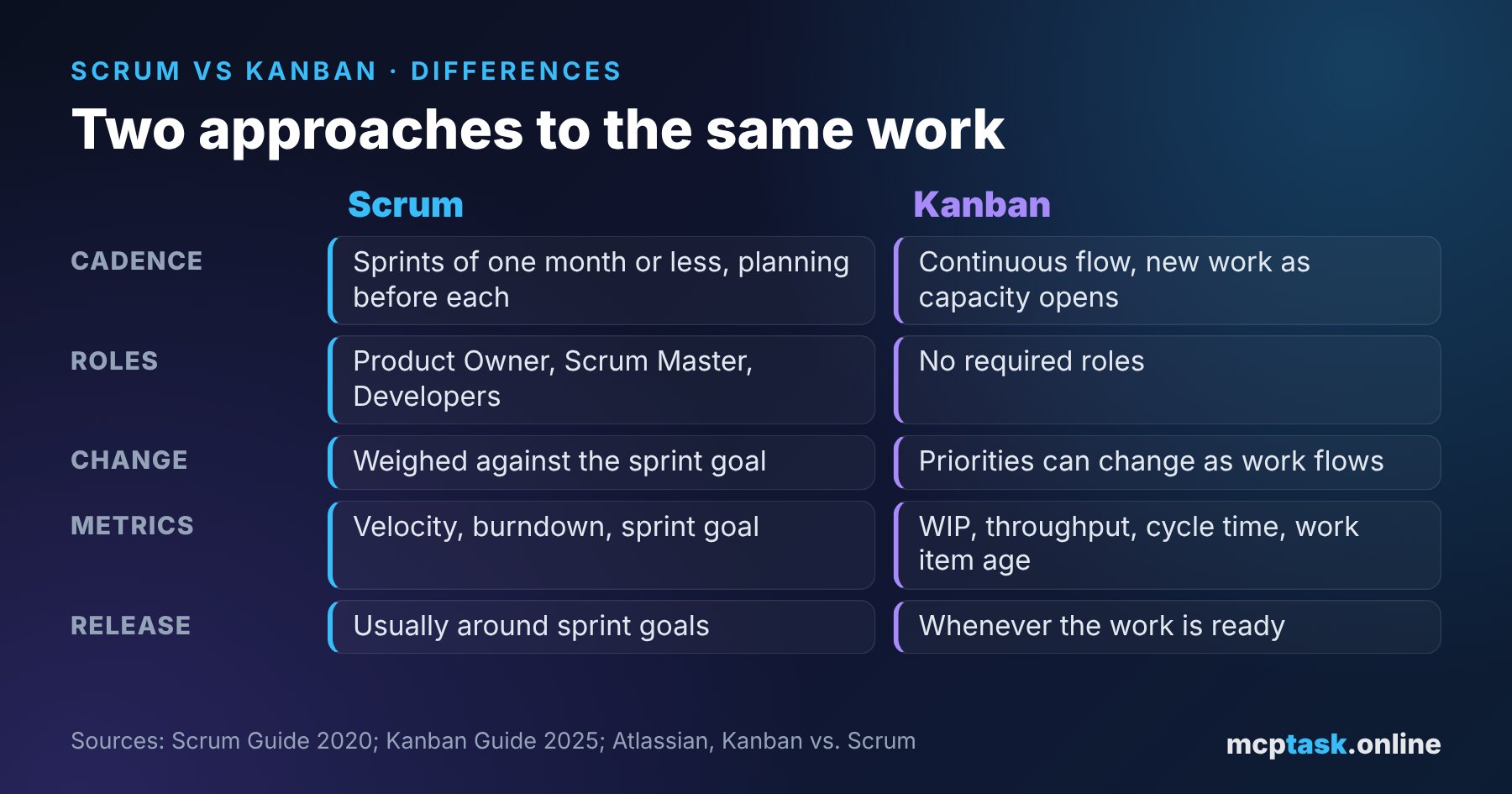
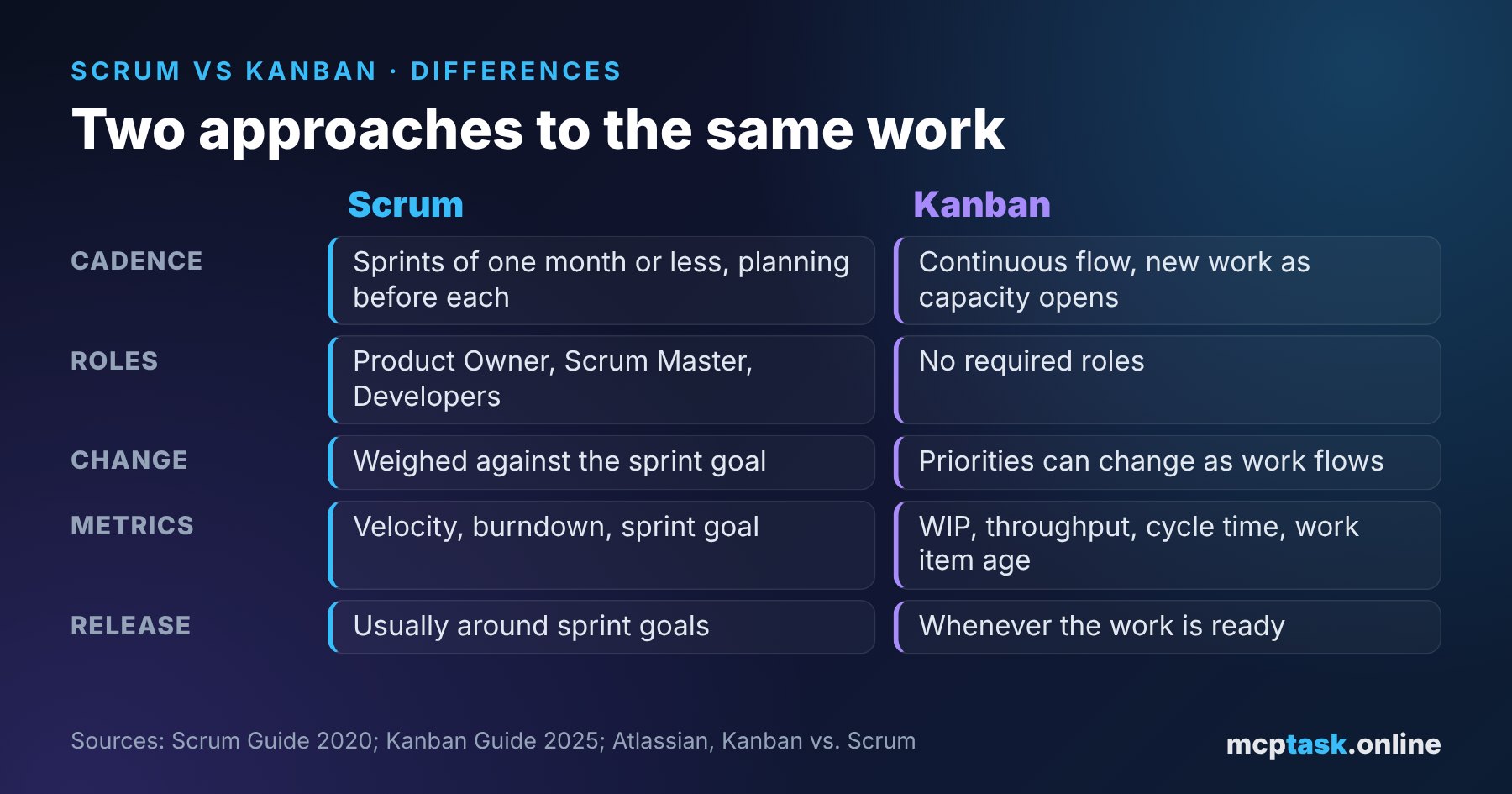
Atlassian sums up the differences in a few points. In Scrum, planning happens before each sprint; in Kanban, new work is pulled in as capacity opens. Scrum usually releases around sprint goals; Kanban releases whenever the work is ready. In Scrum, changes are weighed against the sprint goal; in Kanban, priorities can change as work moves through the system. And while Scrum mostly tracks velocity, burndown and sprint goal progress, Kanban measures lead time, cycle time, throughput and cumulative flow.
For a manager, the takeaway is simple: Scrum gives you a predictable rhythm (you know when the review is and what it will show), Kanban gives you flexibility (an urgent item does not have to wait for the next sprint).
The common enemy: work in progress
Whatever you choose, both approaches fight the same thing: too many tasks in progress at once. In her article on "multiprojecting", Johanna Rothman cites Gerald Weinberg (Quality Software Management): a person working on two tasks spends only about 40% of their time on each and loses 20% to switching. With four tasks it is about 10% on each, and 60% of the time is wasted.
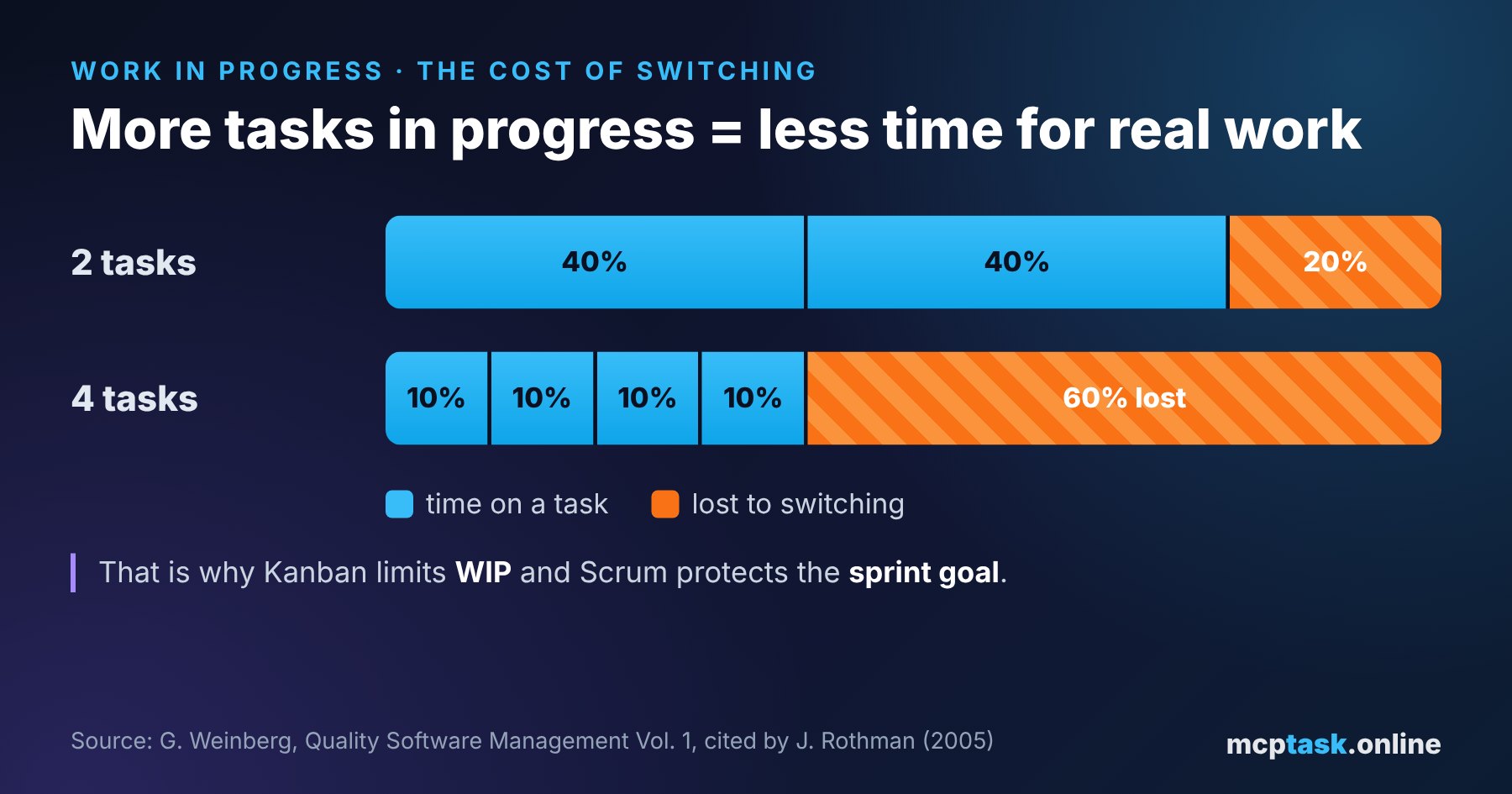
That is why Kanban limits WIP and Scrum protects the sprint goal. Google's DORA research says that WIP limits help improve software delivery performance, especially combined with visual displays of work and feedback from monitoring. DORA also lists the usual mistakes: limits set too high (people still juggle several tasks), relaxing them when someone is idle, and invisible work that is not counted against the limits, such as support, meetings and technical debt. Rather than raising the limit, DORA recommends sending idle people to help where work is piling up.
When to choose Scrum, when Kanban
According to Atlassian, neither approach is automatically better. A practical guide:
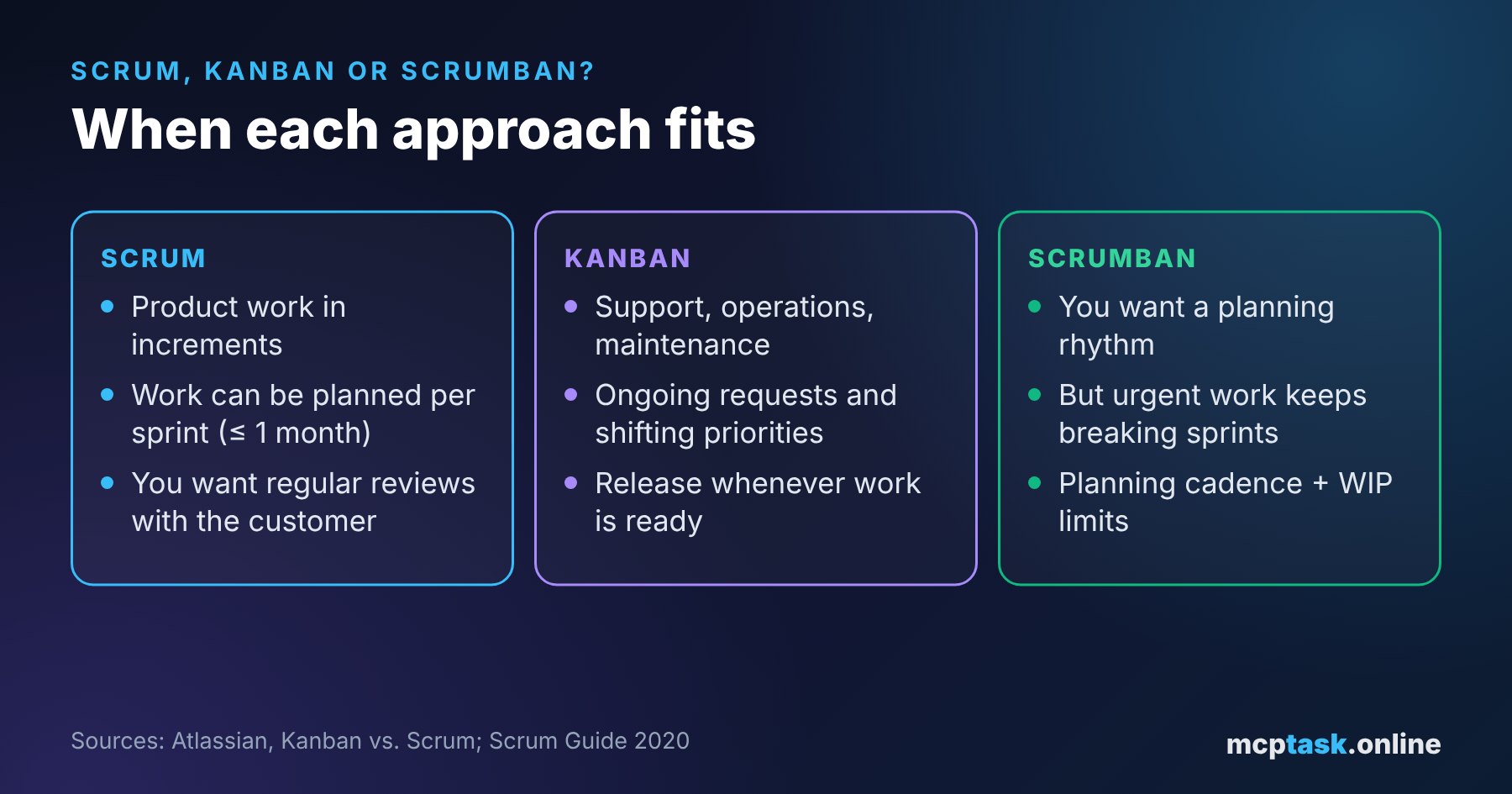
- Scrum suits teams that build a product in increments, can plan work a sprint ahead and benefit from a steady rhythm and regular reviews with the people who commission the product.
- Kanban suits teams with ongoing requests and frequently shifting priorities, typically support, operations and maintenance.
- Scrumban combines Scrum's planning rhythm with Kanban's focus on flow. It fits when you want regular planning, but urgent and unpredictable work arrives too often to protect a fixed sprint scope. Atlassian recommends pairing a planning cadence with WIP limits and measuring whether flow improves.
Watch out for one trap Atlassian also points out: when urgent work repeatedly disrupts sprint goals, it may be a reason to move to Kanban, but the real problem may be poor backlog refinement or oversized work items. Switching methods will not fix that.
That is why a typical software agency often ends up with a mix: new features for clients in sprints, service requests and production bugs in continuous flow with a WIP limit.
A checklist for managers
- Start with the type of work, not the method. How much of it can be planned and how much arrives unexpectedly?
- Make all work visible, including support, meetings and technical debt.
- Limit work in progress, either with a WIP limit or with a realistic, capacity-based sprint plan.
- Split large items into smaller ones with clear acceptance criteria.
- Measure flow: how long items take and how many you finish per week.
- Review after a few weeks whether predictability and speed improved, and adjust the process accordingly.
How mcptask.online helps
mcptask.online does not force you to pick one method. You break a project down into Epic → Story → Task, set task priorities (urgent, high, medium, low) and size tasks with scrum points, which are automatically turned into hour estimates. Scrum teams get sprints; ongoing work gets a single prioritized queue.
Dependencies between tasks are recorded as real blocker links: a blocked task drops out of the "next task" queue and comes back on its own once the blocker is done, so nobody starts work that would only sit and wait. Time is logged against specific tasks, manually or from commits that reference a task, and timesheets export to JSON, CSV or PDF. You can see where the work really goes.
An autonomous AI developer (the runner) on your own infrastructure can pick up small, well-described tasks from the same queue. It picks by priority, writes code and tests and opens a pull request; a human decides on the merge and the release. Routine work stops eating your developers' capacity.
Want sprints and ongoing work in one place? Sign up at mcptask.online – the first 30 days are free, no credit card required.
Sources
- The Scrum Guide, Ken Schwaber, Jeff Sutherland, November 2020
- The Kanban Guide, ProKanban.org, version 2025.5
- Kanban vs. Scrum: Choosing the best Agile framework, Atlassian
- Capabilities: Work in process limits, DORA (Google Cloud)
- Multiprojecting: The Illusion of Progress, Johanna Rothman, 2005 (citing G. Weinberg, Quality Software Management, Vol. 1)